


Choosing the right printer for your business is a crucial decision that can impact your efficiency, productivity, and overall workflow. With the vast array of printers available in the market, it can be overwhelming to decide which one suits your business needs best. This comprehensive guide aims to simplify the process, helping you make an informed decision that aligns with your business objectives, budget, and specific printing requirements.
Understanding Your Printing Needs
Before diving into the myriad of printer options, it’s essential to assess your business’s specific needs:
- Volume: Estimate the average number of pages your business prints monthly. Different printers are designed to handle varying monthly duty cycles without compromising on performance.
- Type of Materials: Consider what you’ll be printing. Do you need a printer that excels in producing crisp text documents, high-quality graphics, or perhaps a combination of both?
- Functionality: Decide if you need a printer with multifunction capabilities. All-in-one printers can print, scan, copy, and fax, which is ideal for offices looking to save space and streamline operations.
Inkjet vs. Laser
The choice between inkjet and laser printers is pivotal and should be based on your printing needs:
- Inkjet Printers: Ideal for businesses that require high-quality color prints, such as marketing materials, photos, and documents with graphical elements. They can print on a variety of paper types and finishes but may have higher long-term ink costs.
- Laser Printers: Best suited for businesses that primarily print text documents and need fast, high-volume printing. They offer speed, efficiency, and typically lower cost per page, especially for monochrome printing.
Consider Multifunction vs. Single-Function Printers
-
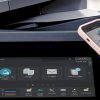
Multifunction Printers (MFPs) combine printing, scanning, copying, and faxing. They save space and often include advanced features like cloud integration.
-
Single-Function Printers focus solely on printing. They’re often more reliable for businesses that already have separate equipment for scanning or copying.
Construction businesses, legal offices, and design studios often prefer MFPs for convenience. Smaller teams may get by with a dedicated printer.
Evaluate Print Speed and Volume
Businesses that print dozens or hundreds of pages daily should look at pages per minute (PPM) and monthly duty cycle (the maximum number of pages a printer can handle per month).
-
Small businesses may only need 1,000–5,000 pages per month.
-
Medium to large offices may need 10,000–50,000 pages or more.
Choosing a printer that can handle your workload prevents costly downtime.
Cost Considerations
A printer’s purchase price is just the tip of the iceberg. Consider the following to understand the total cost of ownership:
- Cartridge Costs: Investigate the cost of replacement cartridges and their yield (how many pages they can print). Some printers accept high-yield cartridges that offer a lower cost per page.
- Energy Efficiency: Look for printers with energy-saving features like automatic duplexing (double-sided printing) and Energy Star certification.
- Maintenance: Understand the maintenance requirements and the ease of access to service and parts. A printer with a reputation for reliability can save you time and money in the long run.
Connectivity Options
Today’s printers come with various connectivity options to streamline your workflow:
- USB Connection: Suitable for a single-user setup. It’s simple but limits the printer to one computer.
- Networked Printers: Ideal for offices with multiple users. These can connect via Ethernet or Wi-Fi, allowing for remote printing and access by multiple users.
- Mobile Printing: Look for features like cloud connectivity and compatibility with mobile printing apps. This is particularly useful for businesses with employees who print from smartphones or tablets.
Security Features
In an era where data breaches are a genuine concern, ensuring your printer has robust security features is paramount:
- Secure Print: Requires users to enter a code at the printer before they can retrieve their documents, keeping sensitive information confidential.
- Network Security: Look for printers with built-in encryption and firewall features, ensuring data sent to the printer over a network is secure.
Printer Size and Scalability
- Space Constraints: Consider the physical size of the printer and ensure it fits in your designated space, leaving enough room for accessing paper trays and maintenance tasks.
- Future Needs: Think about your business’s growth and how your printing needs may evolve. It might be worth investing in a slightly more advanced printer now to avoid the need for an upgrade too soon.
Brand Reputation and Support
Research brands and read reviews to gauge the reliability of their printers. A reputable brand that offers prompt customer support, extensive warranties, and readily available spare parts can save you from future headaches.
Making the Decision
After considering all these factors, narrow down your choices to a few models that best fit your criteria. Compare their features, costs, and any available reviews or ratings. Don’t hesitate to contact manufacturers or sales representatives for any clarifications. Sometimes, seeing the printer in action or getting firsthand user feedback can make the decision easier.
Remember, the right printer for your business is one that not only fits your current needs but can also adapt to your growing business demands. Take your time, do your homework, and choose a printer that will be a valuable asset to your business, ensuring efficiency and productivity for years to come.
Are you looking to streamline your printing operations, reduce costs, and improve efficiency in your office? Looking for the Best Managed Print Services Provider in Los Angeles?
When you want to streamline your printing operations, reduce costs, and improve efficiency in your office, GoodSuite has everything you’ve been looking for. As your local Los Angeles managed print services provider, we specialize in offering comprehensive solutions tailored to your business needs. Whether you’re searching for printers and copiers for sale in Los Angeles or streamlined, effective Los Angeles managed print services, GoodSuite has you covered.
Our expert team is committed to optimizing your printing environment, ensuring you have access to the best equipment, maintenance, and support. Don’t let print management stress you out. Choose GoodSuite for seamless, efficient, and cost-effective managed print services. Connect with us today and take the first step toward transforming your business’s printing infrastructure!
Frequently Asked Questions
What types of printers are available for business use?
There are mainly four types of printers available for business use: Inkjet, Laser, Thermal, and Dot Matrix. Inkjet printers are versatile and can produce high-quality color prints. Laser printers are best for high-volume text printing, offering speed and efficiency. Thermal printers are ideal for printing labels, receipts, and barcodes, commonly used in retail and shipping industries. Dot Matrix printers are less common but useful for multi-part forms or carbon copies in industries like logistics and finance.
How do I decide between a color and a monochrome printer?
Consider your business’s printing needs. If you require high-quality color prints for marketing materials, presentations, or graphics, a color printer is essential. For businesses that primarily print text documents, a monochrome printer may be more economical, offering lower cost per page and faster printing speeds.
What should I look for in terms of print quality?
Print quality is measured in dots per inch (DPI). For crisp text and detailed graphics, look for a printer with at least 1200 x 1200 DPI. Higher DPI is crucial for industries that need to produce high-resolution images or detailed designs, such as marketing or architecture.
How important is printing speed?
Printing speed, measured in pages per minute (PPM), is vital for businesses with high print volumes. If your business relies heavily on printed documents and needs them quickly, prioritize printers with a higher PPM rate. For smaller businesses or those with less urgent printing needs, a moderately fast printer may suffice.
What connectivity options should I consider?
Modern printers offer various connectivity options, including USB, Ethernet, Wi-Fi, and sometimes Bluetooth. Consider a Wi-Fi-enabled printer for flexibility and the ability to print from multiple devices. Ethernet connections are reliable for office settings, while USB may be necessary for direct printing from a specific computer.
Should I consider multifunction printers?
Multifunction printers (MFPs) can print, scan, copy, and sometimes fax, making them a versatile option for businesses looking to consolidate devices and save space. Evaluate your office’s needs to decide if an MFP suits your operations better than having separate devices for each function.